AI Posture Checklist: Quick Daily Fixes for Desk Alignment
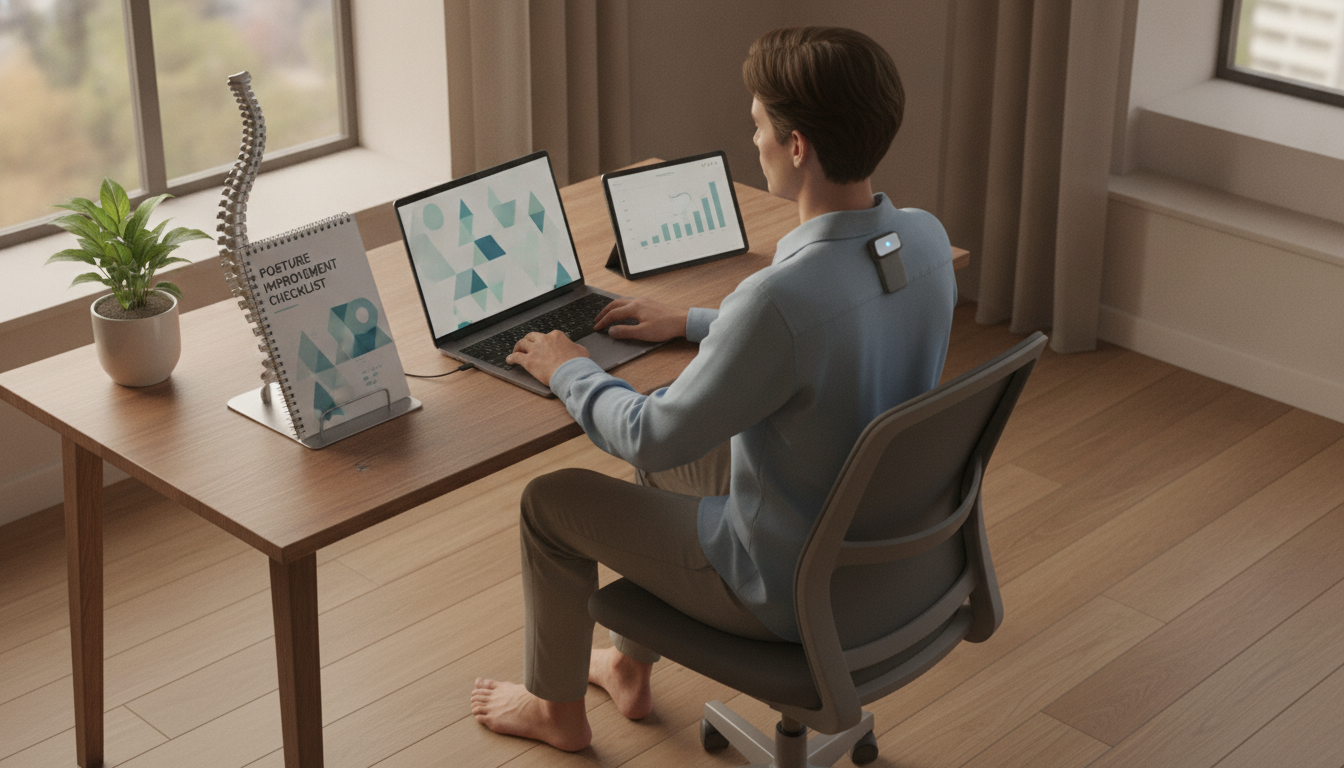
Stand Tall with AI: A Daily Posture Checklist for Easy Alignment
Posture can drift gradually—especially during desk work, phone use, and long commutes—until tight hips, rounded shoulders, and a forward head position start to feel “normal.” A simple daily checklist makes posture practice realistic: quick checkpoints, small resets, and a few targeted moves that fit into real life. This guide pairs a practical alignment routine with AI-friendly ideas so posture cues can be personalized to work style, schedule, and comfort level.
What “good posture” feels like (and what it isn’t)
Useful posture isn’t rigid or “military.” It’s a comfortable alignment you can maintain while breathing easily and moving often. A helpful baseline is ribs stacked over the pelvis, with the head balanced over the shoulders—more like “light and supported” than “pulled back and tense.”
- Neutral pelvis as a starting point: avoid extreme tuck or arch. A gentle glute and lower-ab engagement supports balance without gripping.
- Shoulders: relaxed and wide, not forced back. Think “collarbones broad” instead of squeezing shoulder blades together.
- Neck: lengthened with a soft chin tuck (like making a small double-chin). Avoid craning toward screens.
- Quick self-check: if the jaw is clenched, shoulders are creeping up, or breathing feels shallow, it’s time for a reset.
Daily alignment checklist: a simple rhythm for mornings, work blocks, and evenings
Consistency wins. Rather than chasing a perfect sitting position for hours, use short “check and reset” moments that take seconds and don’t interrupt your day.
Morning (2–4 minutes)
Open the front of the body, wake up glutes and the upper back, and set a comfortable “default” stance for the day.
During the day (20–40 seconds per reset)
Tie micro-checkpoints to habits you already do: opening your laptop, starting a meeting, refilling water, or returning from the restroom.
Evening (3–6 minutes)
Downshift tension in hip flexors, chest, and neck. Gentle thoracic mobility helps you stop carrying the day’s posture into sleep.
Daily posture checkpoints and quick resets
| Moment | 30–90 second check | Quick reset cue | If it feels strained, try this |
|---|---|---|---|
| After waking | Feet hip-width, knees soft, breathe into lower ribs | “Ribs over hips, crown up” | Do 3 slow breaths with hands on lower ribs |
| Starting desk work | Screen at eye level, elbows near 90°, feet supported | “Sit tall from the back, not the neck” | Add a cushion/rolled towel behind mid-back for support |
| Phone use | Notice chin and shoulders | “Bring the phone up, not the head down” | Use voice-to-text or a short phone stand |
| Midday slump | Check hip flexor tightness and glute engagement | “Stand, squeeze glutes gently, breathe out long” | Do 10-second wall lean + 3 long exhales |
| Evening wind-down | Jaw unclenched, shoulders heavy, slow breathing | “Exhale, ribs soften, neck long” | Try a supported chest opener on a pillow |
Move smarter: the 6 best micro-movements for desk posture
These micro-movements are designed to be low-friction: brief, repeatable, and targeted to the most common desk posture patterns (forward head, rounded shoulders, stiff hips).
- Chin tuck (gentle): 5 reps to support deep neck flexors and reduce forward-head posture.
- Thoracic extension on a chair back: 5 slow breaths to open the mid-back so the neck doesn’t over-arch.
- Doorway chest stretch: 20–30 seconds per side to counter rounded shoulders from keyboard work.
- Hip flexor stretch (half-kneeling or standing): 20–30 seconds per side to support a neutral pelvis and reduce low-back compression.
- Glute squeeze + reach overhead: 5 breaths to integrate pelvis and ribcage stacking (feel the ribs settle as the arms lift).
- Scapular retraction pulses (low effort): 8–12 reps for upper-back endurance without shrugging.
AI ideas that make posture reminders feel personal (not annoying)
Reminders work best when they match your schedule and your body—so the cue feels like help, not noise.
A practical setup for screens, chairs, and standing breaks
- Screen height: keep the top third of the monitor near eye level; avoid bending the neck down to a low laptop screen. Helpful reference: Mayo Clinic’s office ergonomics guide.
- Keyboard/mouse distance: keep elbows close; reaching forward encourages rounding and shoulder tension. For workstation checklists, see NIOSH ergonomics resources.
- Feet support: if feet don’t rest comfortably, use a small footrest or a sturdy book to reduce unwanted pelvic tilt.
- Standing breaks: 1–2 minutes every 30–60 minutes. A short walk plus one stretch often beats holding a “perfect” seated posture.
- Lighting and glare: reduce squinting and forward lean caused by dim screens or reflections.
Digital guides that keep the routine simple
- Stand Tall with AI | Posture Improvement Checklist for Daily Alignment includes a ready-to-use daily alignment routine, AI-friendly ideas for personalization, and a simple format that works as a printed sheet or a phone note.
- Your AI-Powered Daily Boost Checklist pairs well with posture work by making it easy to log energy and tension patterns, helping you notice when slouching spikes (often after long meetings or late-day screen time).
When posture issues may need professional input
FAQ
How often should posture be corrected during the day?
Use brief resets every 30–60 minutes or tie them to routine triggers (starting a meeting, refilling water). Comfort and consistency matter more than holding a perfect position all day.
Can posture improvements reduce neck and upper-back tension?
Often, yes—stacking the head, shoulders, ribs, and pelvis can reduce muscle overwork in the neck and upper back. If pain is persistent, radiating, or accompanied by numbness/tingling, get professional evaluation.
What’s a simple posture routine for people who sit all day?
Do a quick workstation setup check, add 2–3 micro-movements (like chin tucks and a doorway stretch), and take 1–2 minute standing breaks every 30–60 minutes. Spread it across the day so the total time stays under five minutes.









Leave a comment